


🚀 NetBrain Live 2026 is Coming to Boston — and There's an Early Bird Deal You Don't Want to Miss
Get answers, share tips, and troubleshoot product questions with fellow NetBrain users and experts.
Recently active
Can NB help in detecting unauthorized network gear ?Such as devices used in a home environment such as NetGear, Linksys, Belkin, etc..These devices could be switches/hubs/AP’s.
Hi NetBrain Team,While we embrace the agentic AI capability brought by NetBrain, I am wondering if NetBrain complies to any AI standards such as ISO 42001 and ISO 42005 as below:ISO/IEC 42001 - The world’s first AI management system standard, providing valuable guidance for this rapidly changing field of technology. It addresses the unique challenges AI poses, such as ethical considerations, transparency, and continuous learning. For organizations, it sets out a structured way to manage risks and opportunities associated with AI, balancing innovation with governance.ISO/IEC 42005 - AI technologies are rapidly reshaping industries, economies and daily life — offering immense benefits, but also raising ethical, social and environmental concerns. ISO/IEC 42005 plays a crucial role in ensuring these impacts are responsibly addressed. By guiding organisations through structured impact assessments, it enables them to align AI development with values such as fairness, safety, and human-centre
We make intensive use of NetBrain's assessment capabilities, often marking checks as ether success or fail and using NetBrain’s dashboard technology to consume results, giving the Red and Green dashboard colours. In some cases, when an ambiguous result arises (needing a manual review), we can’t mark it as either a success or fail. Instead, it should be flagged as a notification or a warning message in a new separate colour, such as yellow. All other customers making use of NetBrain’s assessments and dashboards would benefit from this.
Now that I know that NetBrain can process C# statements for text searching and parsing, I’m trying to create logic that supports Regex patterns.The native NetBrain functions and the C# method all seem to work with fixed text and string variables but not Regex patterns.ReplaceByRegex can search for patterns, but it is limited by when it can be used.Has anyone been able to construct a C# Regex command that uses patterns to search and parse strings?
I have created a basic parser using a show interface command, the parser is stored in the shared folder of the parser library and is created properly. I created a network intent for the exact same command (show interface) yet when i try to load my parser into the intent, Netbrain cannot see it. I’ve tried searching by parser name, CLI command, no matter what i do my parser is never found. If anyone has any ideas please feel free to share them!Thanks.
I’m learning NetBrain.I recently learned how to use a variable method to perform a substring operation on a variable, ex. $Stringvar1.Substring(0,2)After discoverying that that operator worked, I tried to use a “length” method to obtain the number of characters in a string variable. Again an example is: $Stringvar1.lengthThis also worked.The next thing I want to find is a function that searches a string variable for a character or substring and returns the starting postition.The Python string methods for “find” or “index” don’t seem to function.The NetBrain function “find” doesn’t return the search pattern in the target string only a boolean value.Is there a function or method that will return the numerical position of character pattern in a string variable?
Table Of Contents📋 1. Overview 🆕 2. Release Notes Capabilities Supported Device Types and Capabilities What's New in GAL 26.03 Important Architectural Changes 📦 3. GAL Library Installation 3.1 Recommended Environment for Installing the GAL Library 3.2 Installation Sequence 3.2.1 Install GAL from Intent Based Automation Center (IBAC) 3.2.2 Install the Assessment Library (GES) 3.2.3 Install the Rule Discovery Library (GES) 🏷️ 4. Post-Installation: Categorizing GAL Assets 🔍 5. Rule Discovery 5.1 Discover Different Designs in Your Network Configuration Drift Against the Reference Device 5.2 Operational Checks on Designs State Checks for Live Operational Impact 5.3 A Second Worked Example: SNMP Access Protected by ACL Why install Rule Discovery alongside standard GAL ⚙️ 6. Advanced Configuration and Operational Nuances 6.2 End-of-Life (EoX) Solution Supported Vendors: 7. Best Practices and Recommendations 8. Summary📋 1. OverviewThis handbook guides engineers throu
Golden Assessment Library OverviewModern enterprise networks are too complex, dynamic, and vendor-diverse to rely on manual auditing. The Golden Assessment Library (GAL) is engineered to transform network assessment from a reactive chore into an autonomous, continuous process. The overarching mission of GAL is to proactively prevent outages and ensure optimal performance and availability across your infrastructure. At its core, GAL provides comprehensive assessment coverage by evaluating both configuration design consistency and critical operational health indicators across the network. It establishes a unified, data-driven automation framework that provides deep, structured visibility into network health across a wide range of technologies—covering L2/L3 routing and switching, Quality of Service (QoS), High Availability (HA) redundancy, SDN/SD-WAN fabrics, and Cloud environments. GAL is powered by two foundational capabilities: • Assessment Rules: These continuously evaluate the
In NetBrain, we have One IP table which maintain the ip to mac mapping. I want to make observability dashboard which will highlight the alert in dashboard if ip to mac entry change for particular to ip address.Not able to find way to have one ip table data collection once day / as per our schedule and alert if changes happened.
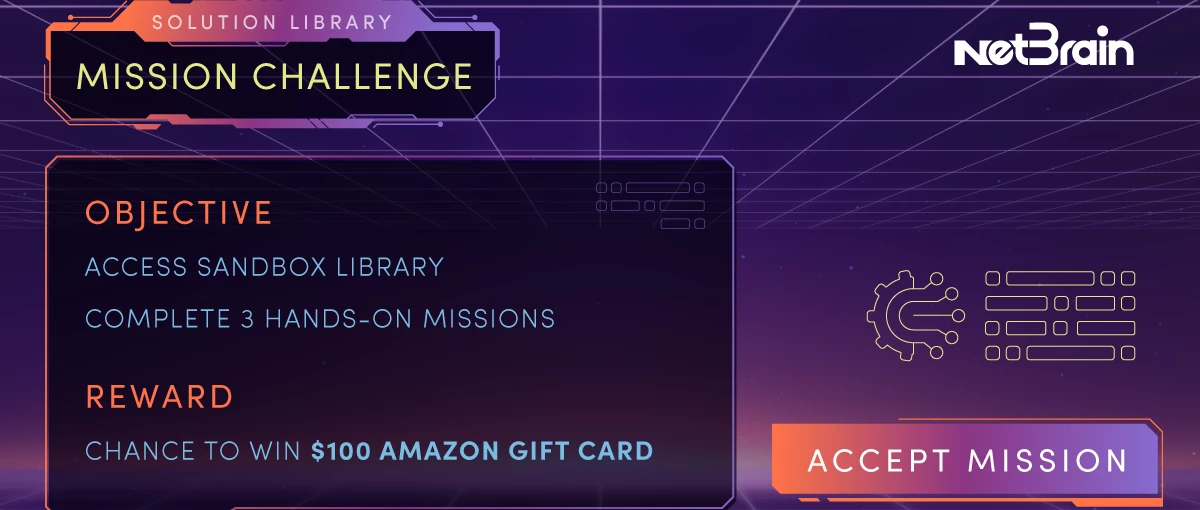
The NetBrain Solution Library is now live and ready for you to jump in.This is your chance to work through real network scenarios in a live sandbox environment that mirrors production conditions—no risk, no setup required.Step into the sandbox, open a mission video, and follow along to diagnose and resolve issues just like a real support case. From outage root cause analysis to building automated runbooks, each mission is designed around real-world challenges.How it works1. Get Sandbox Access Access a live environment and start working immediately. 2. Choose Your Mission Follow guided scenarios and solve real network problems step by step. 3. Earn Your Rewards Complete 1 mission to earn $50. Complete 3+ missions to earn an additional $100. (See FAQs for details) Each mission only takes a few minutes and shows how NetBrain automation can simplify everyday troubleshooting.👉 Start your mission here: https://success.netbrain.com/netbrain-solution-library/💬 Share your experienceAfter co
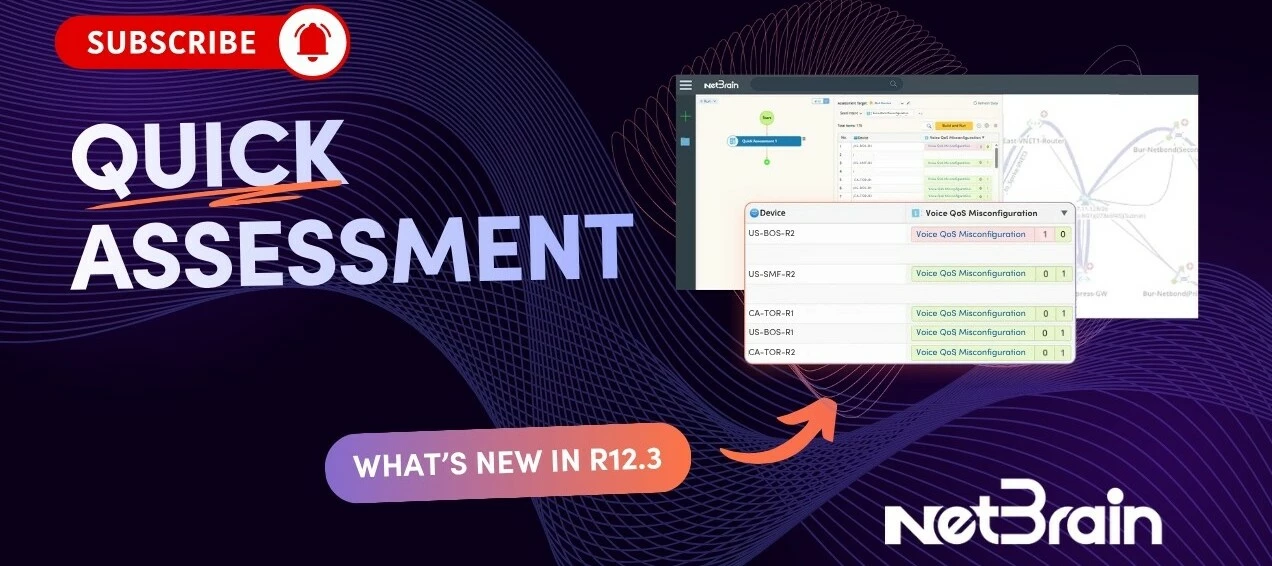
NetBrain 12.3 introduces Quick Assessment, a new capability designed to help network teams quickly validate whether a known issue exists elsewhere in the environment before it causes broader impact.In the example shown, an engineer is troubleshooting a voice aggregation issue between Boston and Toronto. Using a runbook along with the AI Companion, the team isolates the root cause to a QoS misconfiguration. That solves the immediate issue, but it also raises the bigger operational question: if this problem exists in one area of the network, could it also be affecting other sites, applications, or devices?That is where Quick Assessment comes in.With Quick Assessment, engineers can take what they learned from a single incident and scale the same validation checks across the wider network. Instead of stopping after the root cause is found, they can proactively test predefined critical applications and devices for the same type of misconfiguration.In this workflow, the engineer selects a gr
It's been a few weeks since we launched the NetBrain Solution Library Mission Challenge, and the community has been delivering.We've had members work through missions on Post-Mortem Analysis, Transient Problem Diagnosis, Manual Workflow Transformation, Intent-Based Auto Testing, and Critical Applications Monitoring — and the feedback has been outstanding. Here's what participants are saying:"These exercises demonstrate how effectively NetBrain's runbooks, intents, and dashboards handle real-world scenarios, making troubleshooting and documentation both simpler and faster." — Manoj G."I can easily see the use of runbooks and the ability to create templates from them will increase workflow... consistent troubleshooting steps across the entire team." — Stuart T.👀 What's happening inside the sandbox this weekWe took a look at the live activity data from the past 7 days (week of April 13–20), and the missions aren't just being watched — they're being built on.This week alone, active partic
I’m looking at a situation where my firm has bought out another firm and they’d like to merge accounts and the NetBrain instances. On the accounts I’m sure the NB teams can figure that our but wondering how you can merge two different domains and will you lose the history of the devices? anyone ever do this?
Performed a manual switchover for a DR test. All went well, but audit is looking for specific time it happened. Where/can I find those Active/Inactive entries? I see the audit log actions, but those just show the Tenant being switched, not technically which device it was Active on.
Over the past few weeks, the Solution Library Mission Challenge has been buzzing with activity—huge thanks to everyone who jumped in, completed missions, and shared their experience!It’s been great to see how you’re using the Solution Library to work through real-world scenarios and apply NetBrain in a hands-on way. We’ve seen some really interesting insights from the community so far. “These NetBrain sandbox missions are awesome. The real-world examples really clicked for me… building a diagnosis runbook and turning it into a dashboard gave me a lot of ideas.”“All the missions are interesting and closely aligned with real-world scenarios… a great way of learning.”“These scenarios replicate real-world situations and show how powerful runbooks, intents, and dashboards can be.”“This is awesome training and exhibits substantial real-world use cases… I can see how runbooks and templates will improve consistency across the team.”“The documentation feature is excellent… Overall, it was a gre
We want to share an important update: NetBrain’s domain has changed from www.netbraintech.com to www.netbrain.com.While redirects are in place from the old domain to the new one, some organizations use domain-based security controls such as allowlisting, firewall rules, or proxy restrictions. In those environments, redirects may not be enough and could affect access to NetBrain services.To help avoid any disruption, please update your security allowlist to include:www.netbrain.com *.netbrain.com (recommended)This will help ensure continued access to NetBrain resources, including:Our website Customer portal Online help Other related NetBrain servicesExisting domains such as *.netbraintech.com will continue to redirect, but allowlisting the new domain is recommended to prevent any potential access issues.If you continue to experience problems after updating your configuration, please contact our Support team at support@netbrain.com.Thank you for your understanding and cooperation.– NetBr
Mission: Continuously validate live network state against intent. Detect drift, misconfigurations, and risks before they become incidents.
I just completed below missionMission: Identify the root cause of an incident, validate the fix, and scan the network to uncover similar risks automatically.
Most product training shows you features. The NetBrain Solution Library lets you actually use them.It’s a hands-on learning hub where you work in a live sandbox environment, follow guided mission videos, and solve real network issues step by step. No production risk, no complex setup. Just practical experience using NetBrain the same way engineers do in the field.Inside the Solution Library you can:• Diagnose and resolve network incidents• Validate fixes and scan for similar risks• Turn manual troubleshooting into automated runbooks• Detect configuration drift and hidden issues before they become outagesThe format is simple and practical: watch, diagnose, fix, validate.Instead of just learning about NetBrain, you’re building real operational skills.Start your first mission: https://success.netbraintech.com/netbrain-solution-library/
I’m learning NetBrain automation. One project I’m working on is an automation task to update the Cisco trunk port descriptions to reflect the connected switch.I can use a paragraph parser to extract the trunk switch port and CDP neighbor and assign them to a variable using the command line: “show cdp neighbor detail”.This works to extract the switches CDP neighbors and assign variables for switch ports and the connected neighbor.However, when I add a remediation action, the individual switch port and CDP neighbor variable aren’t selectable. (The paragraph parse variable is selectable, but I don’t know if or how to use that object.)Is this behavior to be expected?Is there another way to obtain this information to perform this task?
Is there a possibility to create a ping function that supports a subnet or group of addresses that could be run continuously during a maintenance window so devices can be shown responding prior to and checked following say a router or switch replacement to check the end host status. Maybe an ARP cache as the source list? This would be used for a before and after validation check. This would be helpful when performing lifecycle work and it would part of the runbook results that could be used in the map.
We’ve built a new home for solution-specific content to help you quickly understand how NetBrain tackles real network challenges—across troubleshooting, change management, and network assessments.The Solution Library pulls everything into one place so you can:See how each solution works end-to-end Understand the problems it solves and where it fits into real workflows Access related docs and technical resources without digging through multiple pagesCurrent solutions now available include:Post-Mortem AnalysisLearn how NetBrain automates post-mortem assessments by identifying the root cause of an incident, validating the fix, and performing a network-wide scan to uncover similar risks.Transient Problem DiagnosisLearn how to tackle transient network issues with scheduled intent checks and automated analysis. Capture intermittent problems before they escalate and prevent major outages.Manual Workflow TransformationLearn how to transform any manual workflow into a no-code automated runbook
Did anyone face the below issue, and if yes, how did you work around it?In the intent command, you can add multiple commands, as example “ping 1.1.1.1 || ping 1.1.1.2” and the result will show on one pane, this would also allow you to create multiple parsers to capsulate all known/unknown variables. The problem however is that when you us it like that and use Auto Intent Wizard for replication template to be used for common intent, the commands separated with “||” does not replicate.
Greetings, I am trying to open a text file named “simple-textfile’ on my NetBrain Desktop in a Python Script Module inside a Qapp but am receiving the following error message:OSError: [Errno 22] Invalid Argument: ‘nbfile://Desktop/simple-textfile’ How can I get Python to read or interpret the filepath and open it for parsing? Snippet Python Script:jfile = $Input1.jfile with open(jfile, ‘r’) as f: asdf = f.read() AddMessage(asdf) $Input1.jfile is “nbfile://Desktop/sample-textfile” I tested the filepath with os and it returns that the filepath does not exist:import osif os.path.exists(jfile): AddMessage(“The file path exists”)else: AddMessage(“the file path does not exist”) Result:“The file path does not exist.” Any help is greatly appreciated! Best Regards, Dave
I am a beginner for Netbrain. I am trying to login to the NetBrain University, but not able to. Please help me on this.
Find answers, connect with experts, and get the help you need.
Already have an account? Login
No account yet? Create an account
Enter your E-mail address. We'll send you an e-mail with instructions to reset your password.