
Solved

How do you access variables created in Intent Paragraph parser in the subsequent remediation.

  • January 25, 2026
  • 4 replies
  • 40 views

Forum|alt.badge.img

I’m learning NetBrain automation. One project I’m working on is an automation task to update the Cisco trunk port descriptions to reflect the connected switch.

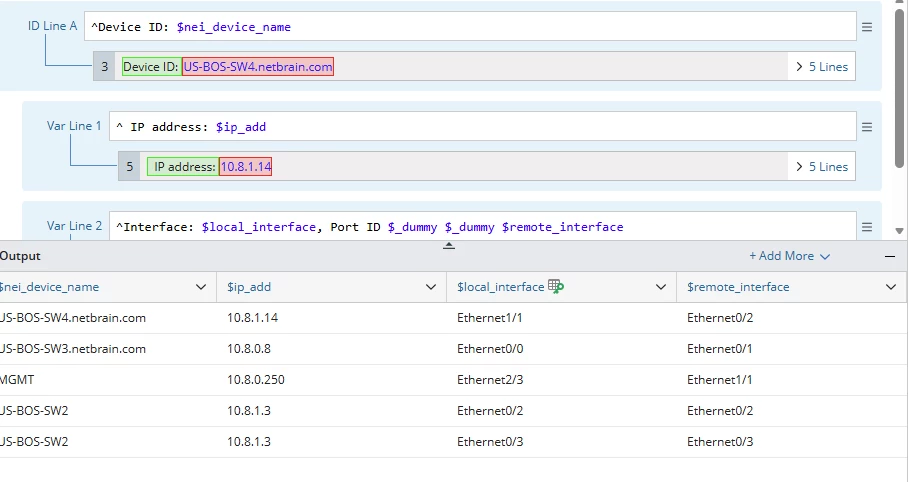
I can use a paragraph parser to extract the trunk switch port and CDP neighbor and assign them to a variable using the command line: “show cdp neighbor detail”.

This works to extract the switches CDP neighbors and assign variables for switch ports and the connected neighbor.

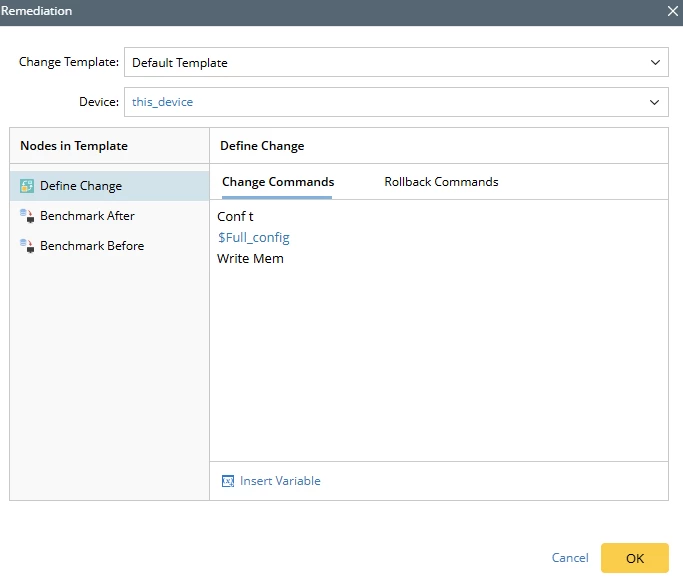
However, when I add a remediation action, the individual switch port and CDP neighbor variable aren’t selectable. (The paragraph parse variable is selectable, but I don’t know if or how to use that object.)

Is this behavior to be expected?

Is there another way to obtain this information to perform this task?

Best answer by dsatbae

To answer my own question, adding a loop object to the paragraph parser table and interface variable as index enumerates the trunkport interfaces and CDP neighbors.


This allows the redemation step to access the interface and CDP neighbor variables.

4 replies

Forum|alt.badge.img
  • Author
  • New Participant
  • Answer
  • January 27, 2026

To answer my own question, adding a loop object to the paragraph parser table and interface variable as index enumerates the trunkport interfaces and CDP neighbors.


This allows the redemation step to access the interface and CDP neighbor variables.


Sothan
Forum|alt.badge.img+1
  • Community Manager
  • January 27, 2026

Thanks ​@dsatbae and welcome to the NetBrain community! 


You can achieve this task using the below steps.


Step 1: parsing the trunk interface collected and neighbor device name from CDP outputs


Step 2: loop through table, create variables using the below logic.


$interface_config = "interface " + $interface_name + "\n description Connected to Neighbor Switch " + $cdp_neighbor_name+” Neighbor Port :”+$neighbor port
 

$full_config = $full_config + "\n" + $interface_config


Step 3: Updating the Interface descriptions using Remediation and call $full_config


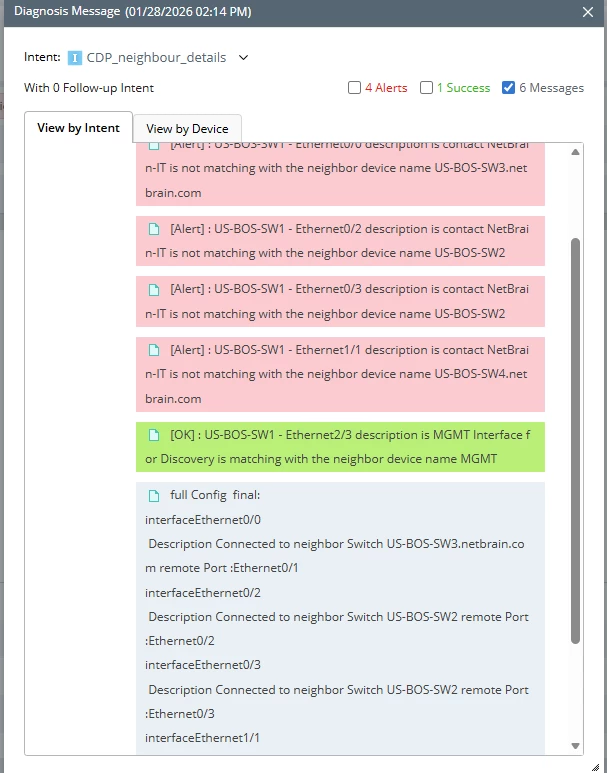
Step 4: Intent sample output. 


Forum|alt.badge.img
  • Author
  • New Participant
  • January 29, 2026

Sothan,

Thanks for the reply.

Looking at your posted solution, I’m doing basically the same thing. I did need to add a “end loop” object to prevent the looping of the interface configurations bleeding into the remediation steps.

The requirement for my company is to identify the remote switch hostname.

I am curious what the rule is for submitting commands to Cisco switches?

I have been including the “end” command in the Remediation step, followed by a “write memory” statement.

One of NetBrain’s application engineers is assisting my company with integration. Their bolder-plate end configuration code is more elaborate than what I use but I suspect that it is doing these to actions automatically.

Am I correct that it is necessary to submit an “end” or “exit” command after the configuration commands?

It also appears that a “save configuration” is also needed?