


Table Of Contents
📋 1. Overview
This handbook guides engineers through installation, configuration, and advanced usage of GAL v26.03 in NetBrain.
It details:
- Installation via Intent Based Automation Center (IBAC)
- Categorization of assets for cleaner operational insights
- Advanced feature configurations (CIS Benchmark, Auto-Test, EoX)
🆕 2. Release Notes
Description
The Golden Assessment Library (GAL) provides comprehensive assessment coverage by evaluating both configuration design consistency and critical operational health indicators across the network.
Version 26.03 significantly elevates these capabilities by integrating deep detection for CIS Benchmark violations across diverse device types. With the addition of Alcatel OmniSwitch to our supported vendor list, GAL continues to bridge the gap between complex network architectures and actionable compliance insights.
End-User Impact
End users will see an expanded set of Assessment Rules installed in their Golden Engineering Studio, providing broader insight into network design adherence and operational health across a wide range of supported devices.
Capabilities
The Golden Assessment Library (GAL) introduces two foundational capabilities designed to enhance visibility, reliability, and standardization across hybrid and multi-vendor networks:
1. Assessment Rules
These evaluate the operational health of devices, features, and protocols, ensuring that configurations, states, and neighbor relationships align with expected baselines.
- Detect deviations that can lead to performance degradation or outages.
- Validate critical configuration and runtime parameters against defined golden standards.
2. Discovery Framework (Config Rule & Intent Discovery)
GAL's discovery engine continuously analyzes network configurations and topology to discover design patterns and generate contextual validation logic.
- Config Rule Discovery: Identifies configuration-based design constructs (e.g., HA pairs, routing clusters, security zones) and ensures golden config consistency across devices.
- Intent Discovery: Dynamically generates validation intents based on discovered designs, verifying both config integrity and operational state for each pattern.
- Enables adaptive automation: As the network evolves, GAL automatically scales with the network, ensuring continuous alignment with real-world deployments.
Supported Device Types and Capabilities
Highlighted in bold are introduced in this version of the library for the first time.
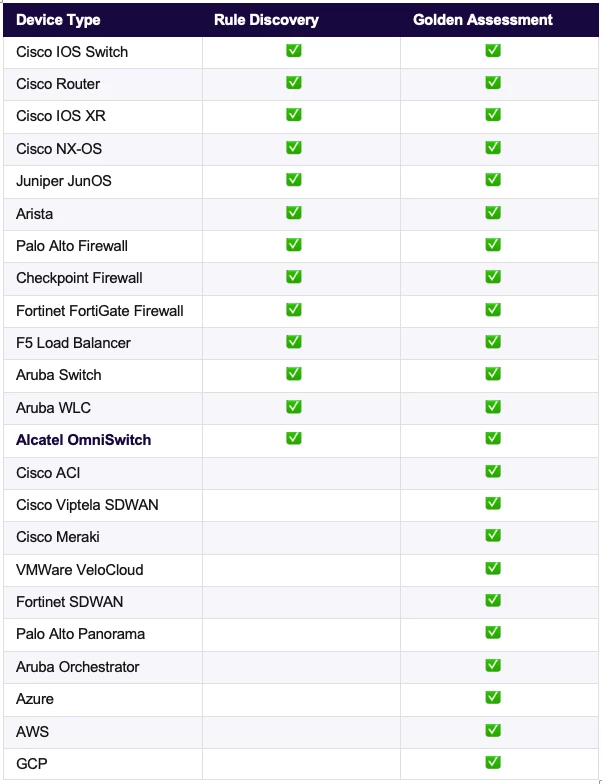
This release expands support for multi-vendor environments and introduces a deeper, design-driven approach to network assessments. This release also includes critical bug fixes to improve stability and performance.
What's New in GAL 26.03
- Expanded CIS Compliance: Now supports industry-standard CIS Benchmark Checks across a wide range of vendors, providing automated security and compliance auditing.
- Alcatel OmniSwitch Integration: Full assessment support has been added for Alcatel OmniSwitch, further broadening your multi-vendor network coverage.
- Automated Provisioning: "Automation Insights" now automatically configures predefined categories upon installation. This streamlines the initial setup process and ensures a more productive "out-of-the-box" experience.
- Stability & Bug Fixes: Includes several performance optimizations and minor bug fixes over v26.01 to ensure a more reliable assessment environment.
Important Architectural Changes
Standalone CVE Solution: Please note that the CVE vulnerability assessment framework is no longer a part of the Golden Assessment Library. To provide better flexibility and faster updates, CVE assessments are now handled via a separate, plugin-based solution that allows for on-demand CVE generation.
Services to be affected
None.
📦 3. GAL Library Installation
3.1 Recommended Environment for Installing the GAL Library
Before installing the Golden Assessment Library (GAL) from the Knowledge Cloud (KC) or via offline import, review these recommendations:
- NetBrain IE Version: Customers must upgrade to version 12.3.0.2 or later before applying this automation package. This version introduces filtered ADT data loading to improve scalability when multiple Network Intents (NIs) write to a shared ADT table. When an ADT is referenced in an Intent, only rows matching a defined condition are loaded, reducing database I/O and improving performance for large datasets. This improvement is highly critical for the CIS Benchmark Solution.
3.2 Installation Sequence
3.2.1 Install GAL from Intent Based Automation Center (IBAC)

- Go to Intent Based Automation Center → NetBrain Download tab.
- From the Library dropdown, choose Golden Assessment Library v26.03.
- If unavailable, click the hamburger menu → Check New Library.
- Verify that the library appears as Golden Assessment Library v26.03 in the library dropdown.
- Select all components and click Install Selected Items.
- Conflict Option:
- Overwrite – installs the complete new library set.
- Skip – retains existing or customized rules.
- Conflict Option:
- Wait for all items to display Installed status.
- Verify the library in Golden Engineering Studio → Golden Assessment → Assessment Library.
Offline Installation (for Customers without Internet Access)
If your environment does not have internet access to the NetBrain Knowledge Cloud, the GAL v26.03 package can be installed offline.
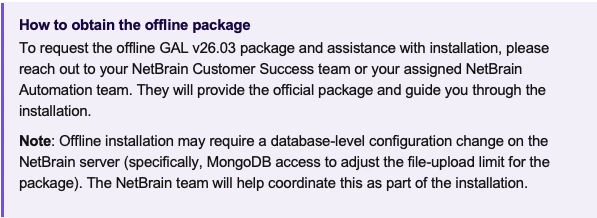
Once you have received the offline package and any required server-side adjustments have been completed, complete the import as follows:
- In Intent-Based Automation Center, click Import Offline Library.
- Browse to and import the downloaded package file.
- After successful import, open the NetBrain Download section, and verify that the library appears as Golden Assessment Library v26.03 (Manually) in the library dropdown.
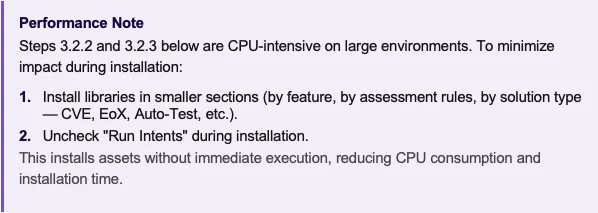
3.2.2 Install the Assessment Library (GES)
- Open Golden Engineering Studio → Golden Assessment → Assessment Library.
- Review rule groups by feature or vendor.
- Select desired Assessment Rules.
- Click Analyze Relevance to check applicability.
- After analysis, choose relevant rules and click Generate Golden Assets.
- If older rules no longer exist in 26.03, review and decide to keep or uninstall them. There are rules related Cloud, SD NET, CVE, EoX etc that are redesigned in line with GAL Guiding Principles.
3.2.3 Install the Rule Discovery Library (GES)
- Navigate to Golden Engineering Studio → Golden Assessment → Rule Discovery.
- Click Discover Rules to initiate template identification.
- Once discovery completes, click Select All or filter by need.
- Click Add, then Build Assessment Rules.
- Confirm the library installation completes successfully.
🏷️ 4. Post-Installation: Categorizing GAL Assets
Categorization organizes GAL assets logically, avoids redundant alerts, and simplifies operational management.
Automated Categorization:
As of GAL v26.03, manual categorization mapping is no longer required. "Automation Insights" now automatically provisions predefined categories upon GAL installation.
This enhancement fully automates the organization of GAL assets, preventing duplicate alerts across "All Vendor" and vendor-specific intents while enhancing clarity in the Insight Manager. It streamlines the initial setup process and greatly improves out-of-the-box usability.
🔍 5. Rule Discovery
Rule Discovery is the part of GAL that learns how your network is actually built and generates the rules that validate it — automatically, continuously, and without anyone having to enumerate every design pattern by hand.
The standard GAL ships universal, best-practice checks (feature-level, vendor-level, protocol-level). Rule Discovery layers on top of that with checks that reflect your specific design choices: how your BGP neighbors are configured, how your QoS policies are stamped, how your SNMP access is protected. As the network grows or changes, Rule Discovery absorbs new instances and extends coverage automatically.
The rest of this section walks through one running scenario — troubleshooting choppy voice calls at a branch office — and finishes with a second, security-flavored example on SNMP access.
5.1 Discover Different Designs in Your Network
Networks are built from repeating design patterns. A campus has dozens or hundreds of branch routers configured the same way; a data center has a handful of leaf-spine pairs; a security perimeter has a standard policy replicated across instances. Rule Discovery scans live configurations and groups devices by the design pattern they implement.
Examples of patterns it identifies:
- BGP neighbors
- BGP-to-OSPF redistribution using a route-map and prefix-list
- QoS policy hierarchies
- QoS policy hierarchies that classify on an ACL permitting WebEx voice server IPs
- NTP protected with an ACL
- SNMP access protected with an ACL
- Firewall policies
Most real-world designs are hierarchical — a design isn’t a single line of config, but a chain of references. A QoS hierarchy reaches policy-map → class-map → ACL → permitted IPs. A redistribution design reaches BGP redistribute → route-map → prefix-list. SNMP access reaches snmp-server community → ACL → permit lines. Rule Discovery follows the entire chain, so a discovered design captures the meaning of the construct (which prefixes are redistributed, which hosts can poll SNMP, which traffic gets voice priority), not just the surface-level statement.
This matters because every drift comparison in the next sections is then made against the full intent of the design — not against a config line read in isolation.
Each group of devices implementing the same pattern is called a Reference Cluster. The cluster is the unit of comparison and the unit of rule generation: every rule Rule Discovery emits applies to all members of a cluster, so coverage scales with the network rather than with rule-authoring effort.
Configuration Drift Against the Reference Device
Within each Reference Cluster, one device is designated as the Reference Device — the gold standard every other device in the cluster is compared against.
Default selection logic:
- The Reference Cluster used as the canonical implementation is the one with the largest population of devices sharing the design — the assumption being that the most-replicated build is the intended standard.
- Within that cluster, the device with the largest configuration file becomes the Reference Device, on the principle that the fullest config typically carries the most complete expression of the design (every feature, every class-map, every ACL element, every leaf in the hierarchy).
Customers can override the Reference Device manually for any cluster, or change the global selection criteria to match their own definition of “gold.”
Once a Reference Device is set, Rule Discovery generates a configuration-drift rule for every peer in the cluster. The peer’s full design hierarchy is checked against the Reference Device’s, and any deviation — a missing class-map, a different prefix-list entry, an extra ACL line — is flagged.
Voice QoS example: All 80 of your branch routers belong to a Branch Voice QoS Reference Cluster. Router A — the largest configuration in that cluster — is the Reference Device. Its design carries the approved Committed Information Rate (CIR) for voice, the class-map matching DSCP EF and the WebEx voice server ACL, the policy-map hierarchy, and the outbound attachment on the WAN interface. If Router B is discovered with a lower CIR, with the WebEx ACL missing one of the voice server subnets, or with the policy attached on the wrong interface, Rule Discovery flags every deviation along the hierarchy — proactively, before any user picks up the phone.
5.2 Operational Checks on Designs
Reference comparison tells you what your network should look like. Operational checks tell you what it is actually doing, day to day. Rule Discovery generates two complementary classes of operational checks for every design it identifies.
Configuration Drift Against the Design’s Own Baseline
In addition to comparing every device against the Reference Device, Rule Discovery tracks each device against its own historical baseline — what the device looked like the last time the design was stable.
The baseline follows a sliding-window model:
- As long as no change is detected on the design, the baseline date moves forward continuously to the current date. A stable device is always its own baseline.
- The moment a configuration change is detected, the baseline freezes and is held for a default of 7 days. During that window, the device is compared against its pre-change state, so drift alerts remain visible.
- After the window expires, the baseline catches up again and the cycle repeats.
- The window length is fully configurable — days, months, or years — so customers in change-control–heavy environments can keep evidence of any change visible for as long as they need.
The practical guarantee: any unexpected change is visible for at least a week, even if no engineer reviews it immediately.
Voice QoS example: Two nights ago, during a maintenance window, an engineer modified the voice CIR on Router B. Today, users start reporting choppy calls. The own-baseline check shows Router B’s current config no longer matches its baseline from before the maintenance — the diff highlights exactly the CIR line and the timestamp of the change.
The combined power of the two drift checks is what makes root cause analysis fast:
- Drift vs Reference only → the device has always been built differently from the standard. Possibly intentional, possibly long-standing technical debt — but not a recent change.
- Drift vs Baseline only → something changed recently here, but it still matches the standard. Likely a routine, in-spec update.
- Both fire on the same device → something changed here recently and it now violates the standard. This is the high-priority alert: a recent unauthorized change has introduced a deviation. You know what changed, when, and that it shouldn’t have.
State Checks for Live Operational Impact
A device can have any configuration and still be silent in the data plane — or have the right configuration and still be dropping traffic. State checks query each device’s operational counters and tables to confirm the design is actually working in the live network.
State checks Rule Discovery generates for relevant designs include:
- Traffic drops on class-maps, policy-maps, and interface output queues.
- ACL lines with zero match counts (likely a misconfigured rule — never matching the traffic it was written for, or simply dead, or worse, accidentally permitting something it shouldn’t).
- Routing prefixes that are never matched in forwarding (likely a misconfigured route or an unreachable next-hop).
- Protocol adjacency and neighbor states.
- Interface error and discard counters tied to forwarding behavior.
Voice QoS example: The own-baseline check told you Router B’s CIR was lowered two nights ago. The state check now tells you the live impact: the voice class-map on Router B’s WAN egress shows non-zero drop counters; DSCP EF packets are being shed by the policer. Together, the three layers — drift vs Reference, drift vs Baseline, live drops — let you say definitively: the recently introduced CIR change is the cause of today’s choppy calls. Not correlation, evidence.
5.3 A Second Worked Example: SNMP Access Protected by ACL
Consider a different design: SNMP read access on every device is protected by an ACL that permits only your NMS subnet. The hierarchy is snmp-server community → ACL → permit lines.
Reference drift: Rule Discovery’s Reference Device for the SNMP cluster carries the approved ACL — one permit line for the NMS subnet, then deny any with logging. Router B is discovered with an extra permit line for an additional subnet in the same ACL. The Reference comparison flags the extra line immediately — the SNMP design on Router B does not match the gold standard.
Baseline drift: If the extra line was added recently, the own-baseline check fires alongside the Reference drift, pinpointing when it was introduced. If the line has been there for months, only the Reference check fires — telling you the device has always been built this way, and the deviation is technical debt rather than a fresh change.
State check: The output of show ip access-list reveals the live behavior: the extra permit line shows zero match counts over the assessment period. Nothing in that subnet is actually using SNMP — so the line isn’t serving any legitimate purpose, but it would allow any host in that subnet to query SNMP if one ever appeared. That makes the finding more than a config-cleanliness issue: it is a silent, dormant exposure on the management plane.
A line-by-line config diff would have flagged “extra ACL entry.” Rule Discovery turns the same observation into a security finding by combining the design hierarchy (this ACL guards SNMP), the Reference comparison (this device is non-standard), the baseline comparison (here is when it was introduced, or that it has been like this for a long time), and the live counter (no one is using it — so why is it there?).
Why install Rule Discovery alongside standard GAL
- Coverage that scales with the network: New branches, new clusters, new patterns are absorbed automatically — no rule authoring required.
- Rules that match your reality: Reference Devices are picked from your own configurations, not from a generic vendor template, so the gold standard reflects how your team has actually built the network.
- Faster root cause: Drift vs Reference, drift vs Baseline, and live-state checks are generated from the same discovered design, so a single alert investigation gives you the full forensic trail — what changed, when, and what it broke — in seconds.
- Findings beyond consistency: Hierarchical design awareness turns mundane diffs (an extra ACL line, a missing class-map entry) into meaningful operational and security signals.
⚙️ 6. Advanced Configuration and Operational Nuances
This section covers specialized GAL components and data-driven automation solutions available in version 26.03.
These include built-in frameworks for End-of-Life (EoX) lifecycle checks, Auto-Test, and CIS Benchmark validation.
6.1 CIS Benchmark Solution
The CIS Benchmark Solution integrates deep detection for CIS Benchmark violations across diverse device types. The solution provides robust compliance visibility and supports comprehensive reporting using ADT reports, dashboarding, and automated remediation wherever applicable.
Supported Vendors and Versions:
- Aruba Switch
- Checkpoint Firewall
- Cisco IOS XE 16.x
- Cisco IOS XE 17.x
- Cisco IOS XR
- Cisco Nexus Switch
- F5 Load Balancer
- Fortigate Firewall 7.0.x
- Fortigate Firewall 7.4.x
- Juniper Devices
- Palo Alto Firewall v10
- Palo Alto Firewall v11
6.2 End-of-Life (EoX) Solution
Supported Vendors:
Cisco, Arista, Dell, and F5.
How It Works
- EoX validation leverages reference data for both hardware and software end-of-life timelines.
- Cisco EoX:
- Requires integration with Cisco SNTC (Smart Net Total Care).
- SNTC populates the built-in NCT table with module-level EoX details.
- Automation references this table to determine EoX status.
- As Cisco's lifecycle data sources evolve, NetBrain will continue to align its EoX integration accordingly.
- Arista, Dell, and F5:
- Customers can populate the following ADTs with vendor-provided EoX data:
- Arista EoX General Data
- Dell EoX Hardware Data
- Dell EoX Software Data
- F5 EOL Hardware Data
- F5 EOL Software Data
- Data can be entered manually or imported via CSV.
- Important: Do not modify ADT column names, as automation relies on predefined schema matching.
- Customers can populate the following ADTs with vendor-provided EoX data:
6.3 Auto-Test Solution
Purpose
The Auto-Test solution validates reachability and path stability for critical IPs across the network.
Core Functions
It performs three validations:
- Ping reachability to critical IPs.
- Traceroute path analysis to confirm connectivity.
- Next-hop consistency check to detect routing table changes.
Data Sources
Auto-Test works with two input sources:
- Automatically fetched IPs from device configurations or CLIs (e.g., SNMP server, DNS, IP Helper).
- User-defined critical IPs, populated in the "Auto Test Critical IPs" ADT (e.g., DC Edge, Core Services, or DC Server IPs).
Execution Control
Auto-Test is disabled by default, since environments that block ICMP can cause ping and traceroute attempts to stall, and stalled attempts extend installation time. Enabling Auto-Test selectively, in environments where ICMP is permitted, ensures the best balance of coverage and performance.
To enable Auto-Test:
- Open the "Reference Data" ADT.
- Locate the row labeled "Perform_AutoTest."
- Change the value in the "Alert Value" column to any non-zero integer.
- This activates Auto-Test during rule execution.
Traceroute Behavior:
- Even when Auto-Test is enabled, traceroute remains disabled by default.
- To enable it:
- In the same "Reference Data" ADT, locate "Perform_Traceroute."
- Set Alert Value to a non-zero integer.
- Traceroute will now run only when ping success rate is 0%.
7. Best Practices and Recommendations
- Always install GAL from IBAC first for dependency alignment.
- Use batch installs or disable runtime execution to control CPU utilization.
- Keep vendor ADT schema intact to prevent validation errors for EoX solution.
- Review EoX data sources periodically for freshness.
- Enable Auto-Test selectively, starting with a small device subset to validate performance.
8. Summary
The GAL 26.03 release establishes a unified, data-driven automation framework across assessment, discovery, and operational validation.
By combining the foundational library setup with advanced solutions (EoX, and Auto-Test), engineers can achieve full-spectrum visibility, from configuration compliance to live operational health, in multi-vendor network environments.