


Connect Any AI Client to Your Network — No Custom Integration Required
AI copilots and agentic platforms are only as useful as the data they can reach. Until now, connecting a tool like Claude, ServiceNow, or any other LLM-powered platform to your network meant custom integration work — bespoke API calls, one-off scripts, and ongoing maintenance every time your network changed.
MCP Server changes that equation. It exposes NetBrain's network data and automation capabilities as standardized MCP (Model Context Protocol) tools, so any MCP-compatible AI client can connect directly to your real-time digital twin and retrieve live network information — instantly, securely, and without writing a single line of custom integration code.
Why It Matters
- Open by design: Bring your own AI client. Claude, ServiceNow, or any other MCP-compatible platform can plug into NetBrain the moment MCP Server is enabled — no custom connector to build or maintain.
- Built on the real-time digital twin: AI clients aren't querying a stale export or a nightly snapshot. They're reading the same live model of your network that powers NetBrain's own diagnosis and automation.
- Governed, not open-ended: Administrators decide exactly which capabilities are exposed, which users can grant access, and which tenants and domains an AI client can reach — automation stays no-code and auditable, never a black box.
- No new license to plan for: MCP Server configuration doesn't require an additional license, so your team can start connecting AI clients today.
How It Works
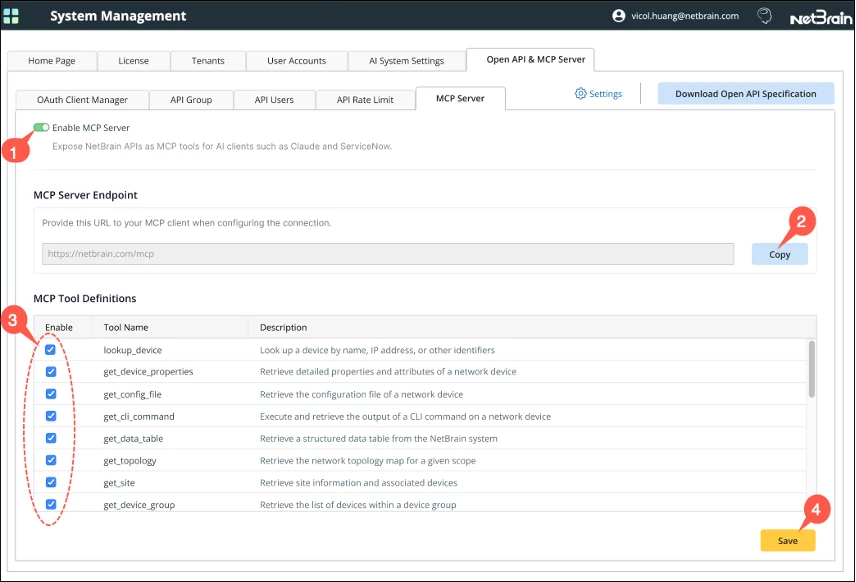
MCP Server lives in System Management, where the existing Open API function has been expanded and renamed "Open API & MCP Server." A dedicated MCP Server tab gives administrators full control over the connection.
- Enable MCP Server with a single toggle. Once enabled, the MCP Server Endpoint URL appears, and every available tool becomes configurable.
- Copy the endpoint URL and hand it to whichever AI client you're connecting — that's the only setup required on the NetBrain side.
- Choose which NetBrain capabilities are exposed as MCP tools. Every tool is enabled by default, and administrators can selectively turn any of them off.
- Save to apply changes — updates take effect immediately.
Secure Access, Built In
Every AI client connects through the OAuth Client Manager, which now supports MCP Server access alongside the existing Open API client. Administrators grant access by selecting a "Run as User" and scoping the connection to specific tenants and domains — an AI client only ever sees the part of the network it's been explicitly authorized to reach.
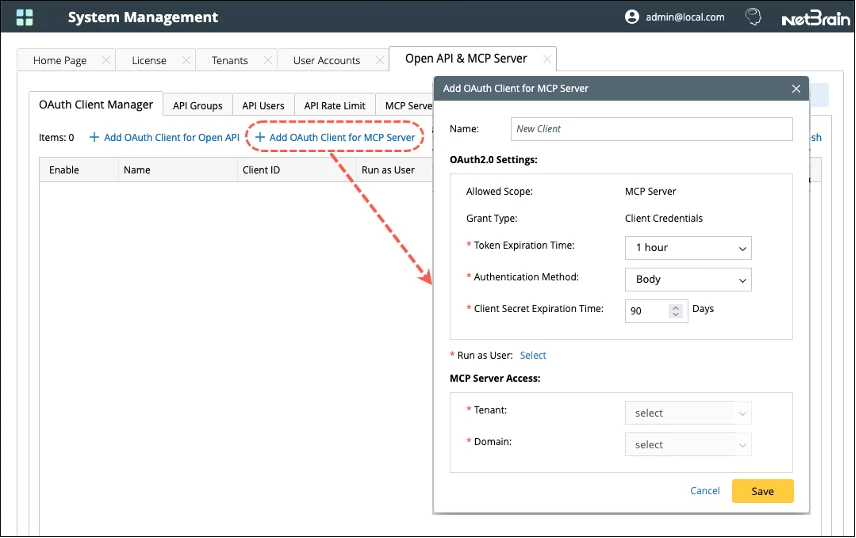
An Allowed Scope column in the OAuth Client Manager makes it easy to see at a glance which clients have MCP access versus standard Open API access, and every enable, disable, and tool-level change is written to NetBrain's Audit Log — so security and compliance teams get full traceability without extra process.
Usage Stays Predictable
For organizations without a PA license, MCP Server tool execution draws on the existing NI daily execution quota — up to 24 runs per day, each with up to 24 intents. That keeps automation usage predictable and cost-controlled as AI clients start driving more of it.
Get Started
MCP Server is available now in NetBrain R12.3. Talk to your NetBrain representative or Customer Success contact to enable it in your environment and start connecting the AI clients your team already uses.
Learn more at www.netbrain.com or reach out to info@netbrain.com.
Author: Nazanin Younesy